
Understanding the Need to Disconnect in a Digital World
The Impact of Constant Connectivity on Mental Health
In today’s hyperconnected world, the line between work and personal life has become blurred. Phones, laptops, and tablets keep us accessible around the clock, creating a perpetual state of alertness and distraction. Imagine Sarah, who regularly checks emails until midnight, leading to restless nights and fatigue the next day. This constant connectivity is linked to anxiety, emotional exhaustion, and even impaired brain development. Many adults report feeling a persistent need to respond to notifications immediately, which increases stress and reduces mental clarity. The pressure to stay available 24/7 drains energy that could otherwise be devoted to relaxation and meaningful social interactions.
Why Reclaiming Personal Time Matters
Reclaiming personal time after work isn’t just about turning devices off—it’s about restoring balance and fostering wellbeing. For example, John noticed that he was spending more time scrolling through his phone than talking to his partner, which created distance in their relationship. Taking deliberate steps to disconnect ultimately gave him more quality time to connect in person and reengage in hobbies like cycling and cooking. This transition helped John feel less overwhelmed and more present. Reclaiming personal time supports mental health, improves sleep quality, and allows for physical activities and socializing that technology often encroaches upon.
Identifying Technology Traps That Bleed Into Personal Time
Work Notifications: The Inescapable Intruders
Work emails, instant messages, and task alerts frequently invade personal hours, extending the workday unintentionally. Consider Emma, who receives work notifications even after hours and feels compelled to respond instantly, despite it cutting into her dinner and family time. This constant intrusion creates an ‘always-on’ culture, making it hard to disengage mentally from work responsibilities. Over time, such interruptions contribute to anxiety and burnout, as the brain never fully switches off from professional demands.
Social Media and Entertainment Overload
After the workday ends, many turn to social media or streaming platforms to unwind, yet these activities can trap users in endless loops of scrolling or binge-watching. Take Mike, who intended to relax by checking his social feeds but found himself absorbed in hours of passive consumption, often comparing himself to others or absorbing negative news. This passive engagement leads to emotional fatigue and diminished attention spans. Unlike active social interactions, passive social media use may result in feelings of isolation rather than connection.
Setting Up Your Environment for Digital Disconnection
Using Device Settings to Schedule Downtime
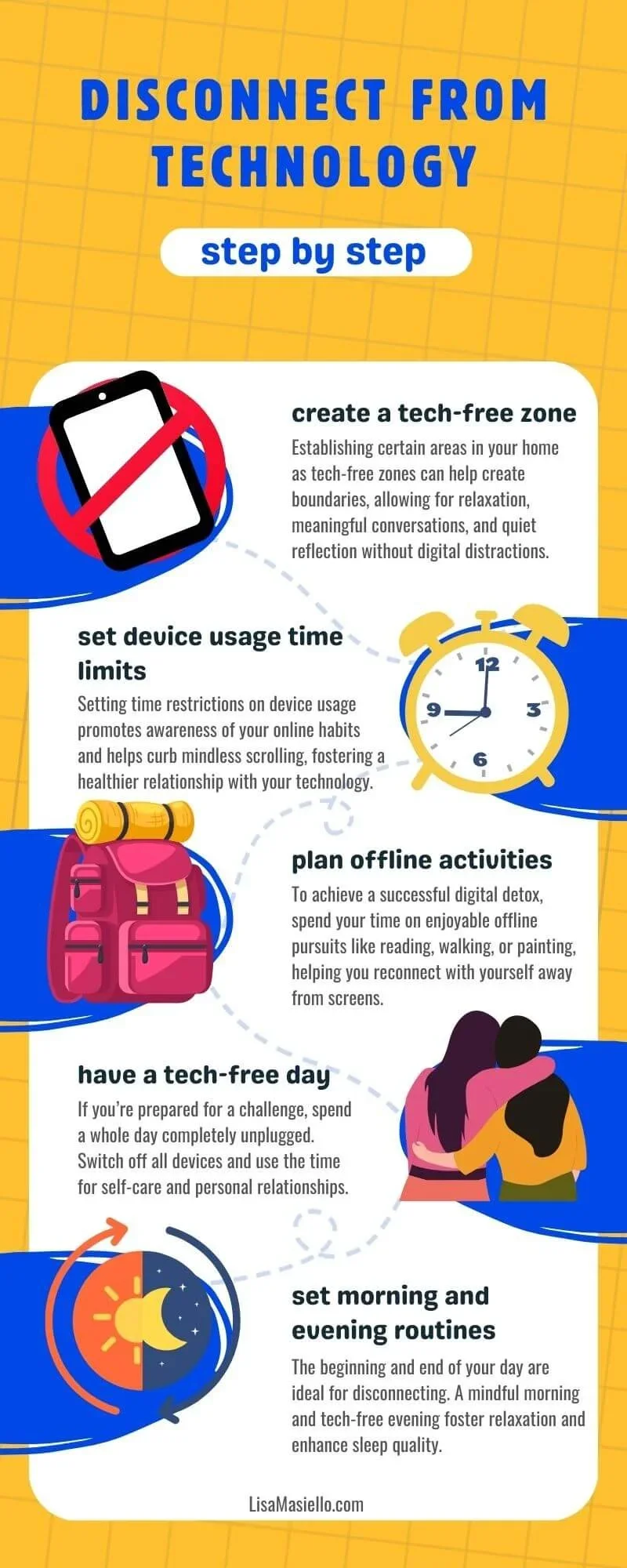
Modern devices offer built-in tools that can help control technology use, such as scheduling screen time limits or activating ‘Do Not Disturb’ modes. Maria discovered that setting her smartphone to disable notifications after 7 PM empowered her to focus on family dinners and reading. These settings help create predictable periods free from digital disruptions, allowing the mind to decompress. Experimenting with options like grayscale displays can also reduce the visual appeal of apps, making it easier to resist mindless check-ins.
Creating Physical Zones Free of Work Technology
One simple yet powerful way to disconnect is designating certain areas in the home as tech-free zones. David and his wife agreed to keep their dining room and bedrooms free of laptops and phones. This physical separation helps signal to the brain that these spaces are for rest or socializing, not work. Charging devices outside the bedroom prevents late-night scrolling and improves sleep quality. Creating such boundaries fosters an environment where presence and relaxation are prioritized over constant connectivity.
Effective Tools and Apps to Help You Disconnect
App Blockers and Focus Modes
To combat distraction, many people turn to third-party applications that block social media or limit app usage during predetermined hours. For instance, Lily installed an app blocker that disabled her access to her most time-consuming apps after 8 PM. Additionally, ‘Focus Mode’ features on smartphones allow users to pause non-essential notifications during work or personal time, reducing interruptions. These tools provide an intentional guardrail to keep technology use in check.
Automation for Routine Tasks to Save Time
Automating repetitive digital tasks can also free up time and mental energy. Tools like email filters, scheduling apps, or smart home assistants can handle tasks that might otherwise demand frequent screen time. Tom used an automation system to batch-check his emails only twice a day instead of constantly monitoring his inbox. This small change minimized his phone addiction symptoms and helped him stay present in his personal life, reducing anxiety related to work overload.
Step-by-Step Process to Unplug After Work
Step 1: Turn Off Work Notifications
Begin by disabling work-related alerts outside office hours. This practical step minimizes the urge to respond immediately and protects personal time. Janet found that turning off work emails after 6 PM allowed her to focus on evening activities and reduced stress significantly. Informing colleagues about your offline times sets clear expectations and reduces pressure to be available constantly.
Step 2: Use Technology to Track and Limit Usage
Next, use built-in tracking tools like Screen Time or Digital Wellbeing to assess how much time you spend on various apps. After monitoring his phone habits, Kevin realized he was checking his phone over 150 times a day. He then set limits on social media apps and removed non-essential notifications. Awareness paired with limits helps regain control and prevents unconscious overuse.
Step 3: Engage in Non-Digital Activities
Following this, replace screen time with enriching offline pursuits. Whether it’s going for a walk, practicing yoga, cooking, or playing board games with family, these activities replenish mental resources. Anna found that joining a weekly dance class not only improved her physical health but also created a natural break from technology.
Step 4: Establish a Nightly Digital Detox Ritual
Finally, commit to a regular evening routine that excludes screens. Charging your phone outside the bedroom and reading a book or meditating before sleep can improve rest quality. Establishing a wind-down ritual signals to the brain that work and digital distractions are over for the day, promoting relaxation and better sleep patterns.
Long-Term Strategies for Maintaining Healthy Tech Boundaries
Regular Digital Detox Challenges
Over time, incorporating scheduled digital detoxes—be it a weekend retreat or designated offline days—helps reset habits and reduce dependency. For example, Mark organizes monthly tech-free weekends where he avoids all screens, reconnecting with nature and loved ones. These detoxes restore mental clarity and reduce anxiety sparked by continuous connectivity.
Communicating Boundaries with Employers and Colleagues
Maintaining boundaries requires clear communication with your workplace. By openly discussing availability and setting realistic expectations, you protect your personal time and reduce guilt associated with disconnecting. Sarah informed her team that she would not respond to emails after 7 PM, which was respected and supported, enabling her to enjoy a healthier work-life balance.
Measuring the Benefits of Disconnecting
Improved Sleep and Mental Clarity
After reducing screen time, many individuals notice improved sleep quality as their brains are less overstimulated before bedtime. Better rest leads to increased mental clarity, sharper focus, and reduced emotional fatigue. Tom, for instance, reported feeling more energized and less anxious after adopting a nightly digital detox, highlighting the restorative power of disconnection.
Enhanced Productivity and Work-Life Balance
Paradoxically, stepping away from technology often boosts productivity. When free from constant interruptions, work sessions become more focused and efficient. Furthermore, reclaiming personal time enriches relationships and overall satisfaction. Lisa’s experience illustrates this: by setting clear tech boundaries, she improved her output at work while reconnecting with her family, achieving a healthier and more fulfilling lifestyle.


